
Online Safety and Digital Guidance
Online Safety
St Peter’s Primary recognises the benefits and opportunities that new technologies offer to teaching and learning. We encourage the use of technology in order to enhance skills and promote achievement. However, the accessible and global nature of the internet and variety of technologies available mean that we are also aware of potential risks and challenges associated with such use.
E-safety is an integral part of ICT and school life at St Peter’s. Throughout the curriculum we work to ensure that children understand how to keep safe when using modern technology. Younger members of school also bring home Hector the Dolphin to share ways of keeping safe with their parents and carers.
If you have any concerns about a child's safety please contact Angela Hunt.
There are very useful resources to help you protect your child at:
BBC – Cyberbullying advice - http://www.bbc.co.uk/learningzone/clips/cyberbullying-impact-and-prevention/5592.html
CEOP- Child Exploitation and Online Protection Centre - www.ceop.police.uk
https://www.thinkuknow.co.uk/parents/Primary/Risks/Cyberbullying/
Digizen – positive digital citizen resources on social networking and cyberbullying -
http://www.digizen.org
Facebook advice for parents - https://www.facebook.com/safety/groups/parents/
https://www.childnet.com/resources/video-lessons/ - Six easy-to-follow videos on key online safety messages for parents, carers and professionals to watch together with children aged 6-9 years old.
Internet watch foundation, resources on AI and image use - https://www.iwf.org.uk/resources/ai-child-abuse-imagery-parent-guide
Mobile Phones
Block em app for android/blackberry mobile phones
http://www.blockem.co.uk/
We would also like to draw you attention to the legal age limits for the following social network sites. As you are aware, children of primary age should NOt be accessing any of these platforms.
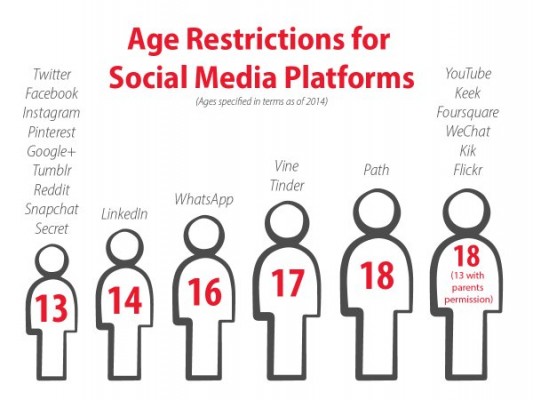
If we experience concerns around a child’s use of any of these sites we may decide to report this to the provider and ask for the account to be closed down or, in serious cases, refer situations to the police. We are concerned about the time it can take teachers to sort out things that have happened, on the Internet, outside school hours. This takes away from important learning time so please support us by teaching safe habits to your children.
Digital Guidance
Please find below some resources that we wanted to share that may be useful to you:
https://families.google/intl/en-GB_ALL/familylink/ - Family Link provides tools that respect families' individual choices with technology, helping them create healthy, positive digital habits. With easy‑to‑use tools, you can understand how your child is spending time on their device, share location, manage privacy settings and find the right balance for your family. (Please note this is for certain Android and Chrome devices).
https://support.apple.com/en-gb/105121 - Set up parental controls to manage your child's iPhone or iPad.
https://www.papayaparents.com - PAPAYA promotes wellness and improved mental health in adolescents by helping young people achieve a healthy balance with technology.
https://smartphonefreechildhood.co.uk - Smartphone Free Childhood is a grassroots movement bringing parents together to stand up for healthier, happier childhoods.
https://en.help.roblox.com/hc/en-us/articles/30428248050068-Parental-Controls-FAQ - Parental controls on the gaming platform Roblox.